How a Process Is Created in Linux: From fork() to exec()
Creating a process is one of the most fundamental operations in an operating system. Every program you run—whether it's a shell command, a web server, or a background daemon—goes through this lifecycle.
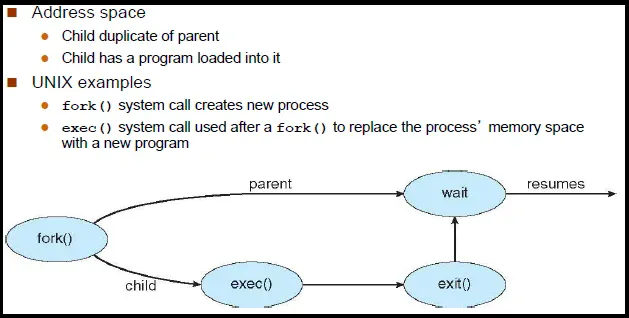
In Unix-like systems, process creation is a two-step dance:
- fork() – duplicate the current process
- exec() – replace the process image with a new program
Let's break this down step by step, including what happens to memory, page tables, and how Copy-On-Write (COW) makes everything efficient.
1. What Is a Process?
A process is a running instance of a program, consisting of:
- Program code (text)
- Data (global & static variables)
- Heap (dynamic memory)
- Stack (function calls, local variables)
- CPU registers
- File descriptors
- Virtual address space
Each process is isolated and managed by the kernel.
2. The Role of fork()
fork() creates a new process by duplicating the calling process.
- The original process → parent
- The new process → child
Both continue execution from the same instruction after fork().
Key Behavior
- Parent receives child PID
- Child receives 0
- On failure,
fork()returns -1
3. Basic fork() Example
#include <stdio.h>
#include <unistd.h>

int main() {
    pid_t pid = fork();

    if (pid == 0) {
        printf("Child process (PID=%d)\n", getpid());
    } else {
        printf("Parent process (PID=%d), child PID=%d\n", getpid(), pid);
    }

    return 0;
}
Output (order not guaranteed)
Parent process (PID=1000), child PID=1001
Child process (PID=1001)
4. What fork() Really Copies
Conceptually, fork() duplicates:
- Virtual memory layout
- File descriptor table
- Signal handlers
- Process metadata
⚠️ But modern kernels do NOT eagerly copy memory.
This is where Copy-On-Write comes in.
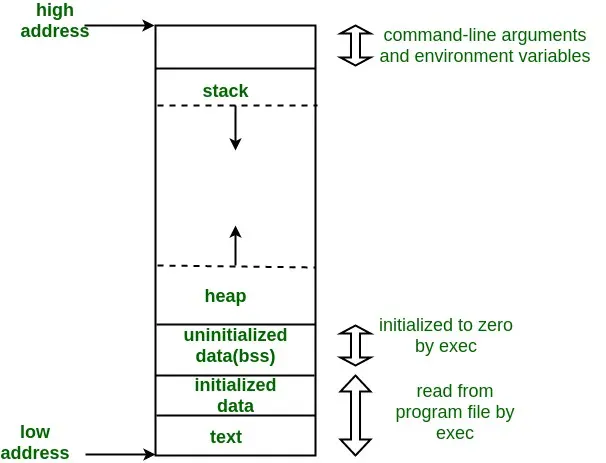
5. Process Memory Layout
Each process has a virtual address space that looks like this:
| Segment | Description |
|---|---|
| Text | Program code (read-only) |
| Data | Global/static initialized variables |
| BSS | Uninitialized globals |
| Heap | malloc() memory |
| Stack | Function calls & locals |
6. Copy-On-Write (COW)
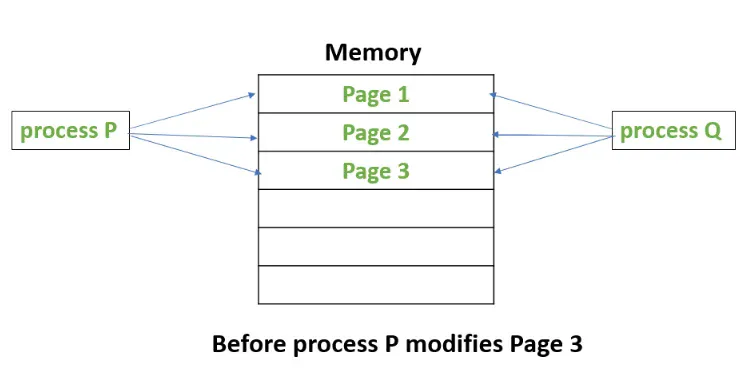
Instead of copying all memory pages during fork():
- Parent & child share the same physical memory pages
- Pages are marked read-only
- Actual copying happens only if one process writes
Why COW Is Brilliant
fork()becomes very fast
- Memory usage is minimized
- Ideal for
fork()→exec()pattern
7. COW in Action (Code Example)
#include <stdio.h>
#include <unistd.h>

int global = 10;

int main() {
    pid_t pid = fork();

    if (pid == 0) {
        global = 20;  // triggers Copy-On-Write
        printf("Child: global=%d\n", global);
    } else {
        sleep(1);
        printf("Parent: global=%d\n", global);
    }

    return 0;
}
What Happens Internally
- After
fork()→ parent & child share the page
- Child writes to
global
- Kernel:
- Allocates a new page
- Copies data
- Updates child's page table
- Parent remains unchanged
8. Page Tables & COW
- Parent & child page tables point to same physical frames
- Write attempt → page fault
- Kernel resolves fault by copying the page
9. File Descriptors After fork()
- File descriptors are shared
- File offsets are shared
- Reference counts are incremented
int fd = open("file.txt", O_WRONLY);
fork();
write(fd, "Hello\n", 6);  // affects same file offset
10. From fork() to exec()
Usually, fork() alone isn't enough. We want the child to run a different program.
That's where exec() comes in.
11. What exec() Does
exec() replaces the current process image:
- Old code, data, heap, stack → destroyed
- New program loaded
- PID stays the same
Common Variants
execl()
execv()
execvp()
execve()(system call)
12. fork() + exec() Example (Shell Pattern)
#include <stdio.h>
#include <unistd.h>

int main() {
    pid_t pid = fork();

    if (pid == 0) {
        execl("/bin/ls", "ls", "-l", NULL);
        perror("exec failed");
    } else {
        wait(NULL);
        printf("Child finished\n");
    }

    return 0;
}
What Happens
- Parent calls
fork()
- Child created (COW memory)
- Child calls
exec()
- Kernel:
- Loads /bin/ls
- Sets up new memory layout
- Jumps to main()
13. Memory Before vs After exec()
| Before exec() | After exec() |
|---|---|
| Parent memory | Completely new |
| COW pages | Discarded |
| Same PID | Same PID |
14. Why fork() + exec() Instead of One Call?
fork() → flexibility
Parent can:
- Set up pipes
- Redirect I/O
- Change environment
exec() → clean program start
This design is a cornerstone of Unix philosophy.